
Coupons
Coupons are specialized promotional vouchers identified by a unique Barcode. Unlike standard discounts, a coupon has a specific monetary value and a validity period that triggers only after the coupon is activated.
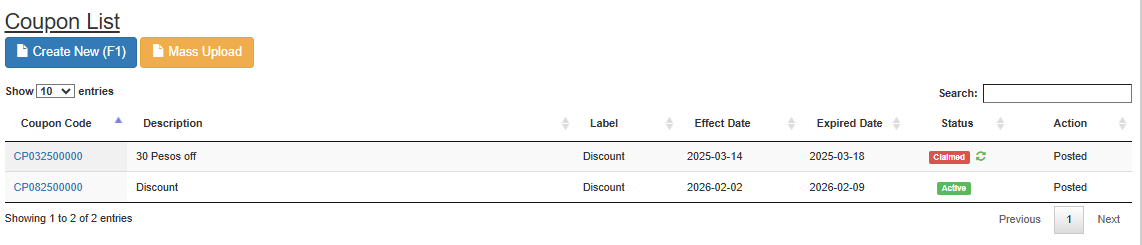
1. How to Create a Coupon
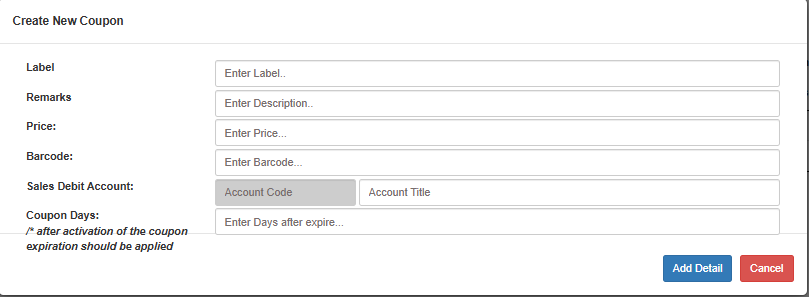
To manually generate a new coupon:
Navigate to Master Files > Price List > Coupons.
Click Create New (F1)
Label: Enter the name of the coupon (e.g., "Holiday Voucher P500").
Remarks: Add internal notes or terms (e.g., "Valid for all hardware items").
Price: Enter the face value of the coupon (e.g.,
500).Barcode: Scan or type the unique identifier for this specific voucher.
Sales Debit Account: Select the account where the coupon value will be debited upon redemption.
Coupon Days: Enter the number of days the coupon remains valid after activation
Click Save
Example: If set to 30, the expiration is applied 30 days from the moment the coupon is triggered/used.
2. Coupon Mass Uploading
For high-volume voucher generation, use the Mass Upload tool located in the Coupons List view.
Steps to Mass Upload:
Download Template: Click this button first to get the standardized format for your coupon data.
Select Action (Dropdown): Choose between Preview (to check for errors/duplicates) or Save (to commit to the database).
Choose File: Attach your completed Excel/CSV file from your computer.
Submit: Click the Submit button to process the selected action.
3. Key Parameters Table
| Field | Description |
|---|---|
| Label | The identifier for the coupon (e.g., Holiday Voucher P500). |
| Remarks | Internal notes or specific terms for this coupon. |
| Price | The actual monetary value deducted from the customer's total. |
| Barcode | The unique string used to verify the coupon at checkout. |
| Sales Debit | The GL account where the coupon value is debited. |
| Coupon Days | The lifespan of the coupon; expiration starts after activation. |
💡 Usage Tip: The Coupon Days logic is ideal for gift cards. The "clock" doesn't start ticking when you create the record in MyxFin, but only when the customer actually activates the voucher, ensuring they get their full time allotted.