
BIR Files and Forms
This module allows users to generate tax-compliant files and forms required for BIR (Bureau of Internal Revenue) submissions.
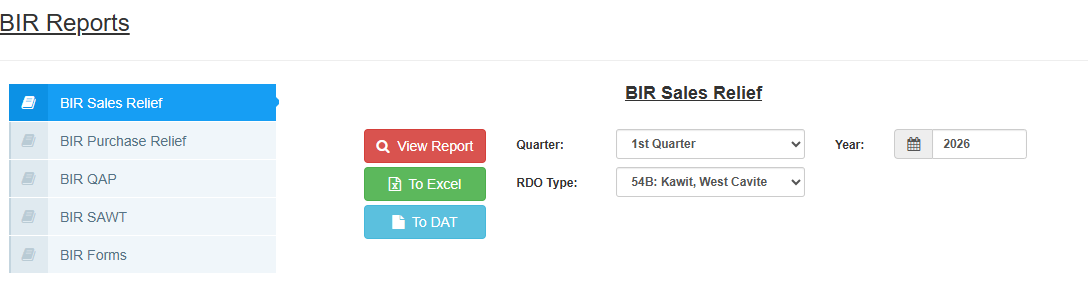
| Report Name | Purpose |
|---|---|
| BIR Sales Relief | Summary List of Sales (SLS) for VAT-registered taxpayers. |
| BIR Purchase Relief | Summary List of Purchases (SLP) for VAT-registered taxpayers. |
| BIR QAP | Quarterly Alphabetical List of Payees for creditable income taxes withheld. |
| BIR SAWT | Summary Alphalist of Withholding Taxes (used for claiming tax credits). |
| BIR Forms | Official tax forms (e.g., 2550Q, 1601EQ) for review and filing. |
Typical Parameters (Relief, QAP, SAWT)
For most BIR-related files, you will need to set the following filters:
Quarter: Select the applicable period (1st to 4th Quarter or Annual).
Year: Enter the fiscal year for the filing.
RDO Type: Select your registered Revenue District Office code from the dropdown (e.g., 001: Laoag City, 003: San Fernando, etc.).
Action Buttons
For Relief files, QAP, and SAWT, you have three primary actions:
View Report (Red Button): Displays the data on-screen for checking.
To Excel (Green Button): Downloads the data for internal reconciliation.
To DAT: Generates the specific
.DATfile required for upload to the BIR's e-Submission/Relief system.
BIR Forms
The BIR Forms section works differently, as it is designed to help you prepare the actual tax return.
Date: Select the specific filing date.
Please Select a Form: Choose the form number you need to generate (e.g., 2550Q, 1601EQ, 1702).
Review Form (Button): Click this to generate a preview of the form based on the system's transaction data.
💡 Filing Tip: Always click View Report or To Excel to audit your data before clicking To DAT. This ensures that all Taxpayer Identification Numbers (TIN) and address fields are correctly populated, preventing errors during the BIR validation process.