
Item Types
Item Types in MyxFin are used to categorize inventory items based on their nature or purpose. This module helps organize items within the system, making it easier to manage inventory, track transactions, and generate accurate reports.
How to Create a New Types
- Go toMaster Data Files
- ClickItems
- ClickType
- ClickCreate New (F1)
- Enter the details of the new Type.
- ClickAdd Details
Visual Guide
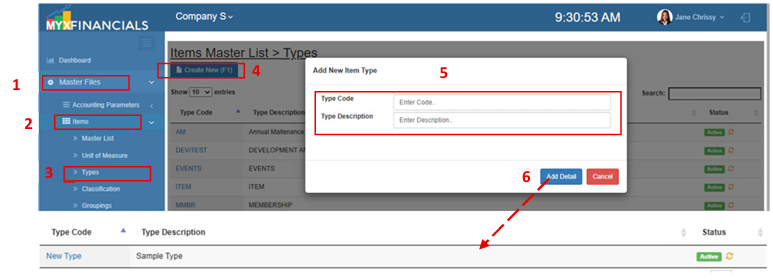 Figure 1: Item Types.
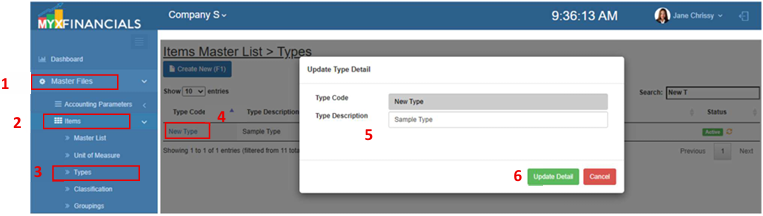
How to Update Types :
- Go toMaster Data Files
- ClickItems
- ClickType
- Click theItem type code
- Enter new details
- ClickUpdate Detail
How to inactive the Types:
- Go toMaster Data Files
- ClickItems
- ClickType
- ClickActive(Green) /Inactive (Yellow) icon
