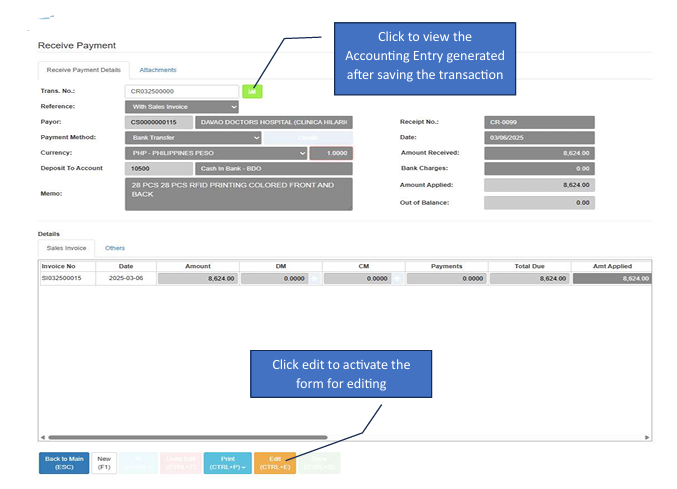
AR Payment
AR (Accounts Receivable) Payment allows you to record and manage payments received from customers. This ensures that your customer ledgers are updated and that your cash-on-hand or bank balances reflect the collection.
💡 Note: Only transactions without reference or with cancelled reference to Deposits will be available for unposting.
How to Create a New Transaction
Click the Create New button to open a new form.
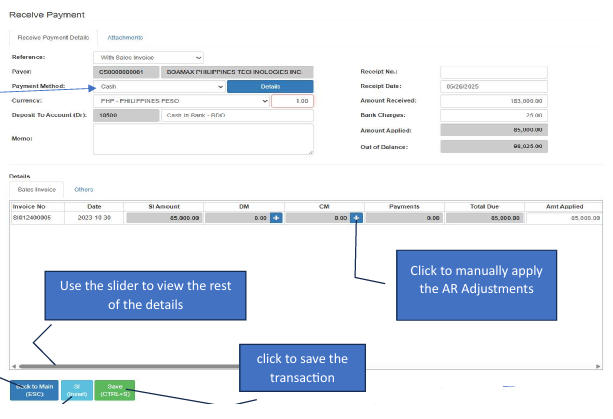
Choose Payment Method Select how the customer paid (e.g., Cash, Check, or Bank Transfer) from the available methods.
To add details, search for the customer first before clicking the SI (Insert) button.
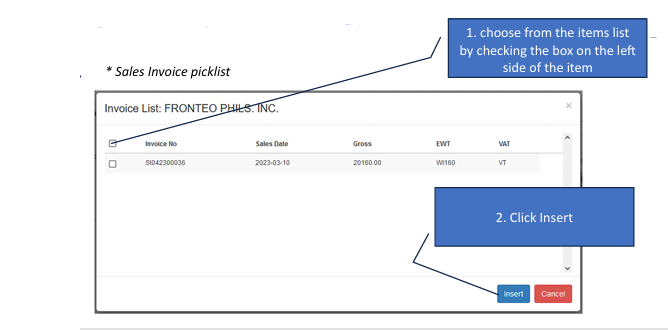
Insert Sales Invoices (SI) Click the SI (Insert) button to open the picklist of unpaid invoices. In the Pop-up: Check the box on the left side of the specific invoices being paid. Apply: Click the Insert button to bring them into the payment details.
Apply Adjustments (CM) : Automatic: Any adjustments created for the selected Sales Invoice will be automatically added to the details. Manual: You can also click the Manual Apply button under the CM (Credit Memo) section to specifically link other AR Adjustments.
Save Review the payment totals and click the Save button.
How to Edit a Transaction
Open Record From the main dashboard, click the Transaction No. of the payment you wish to change.
Enter Edit Mode Click the Edit button to unlock the fields.
Modify Details Update the payment amount or add/remove invoice references. The Save button will activate while in this mode.
Exit or Cancel Click the Undo Edit button to discard changes, or Back to Main to return to the list without saving.