
Purchase Order
The Purchase Order (PO) module allows you to manage orders for goods or services from your suppliers. This ensures that all purchases are documented, tracked, and properly aligned with approvals.
💡 Note: Transactions can only be unposted if they have no active references (or cancelled references) in Receiving or APV.
How to Create a New Transaction
Start the Order
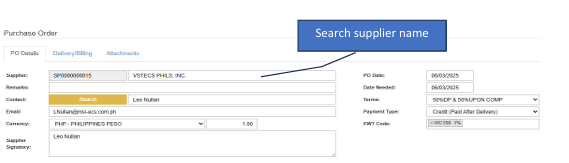
Click the Create New button to open a new form.Select Supplier
Search for and select the Supplier Name first.Choose Payment Type:
Credit → For purchases to be paid after delivery.
Advance → For purchases paid before delivery.Add Items (Two Methods):
Manual Entry → If a PR is not required, search for items by Code or Description directly in the details section.
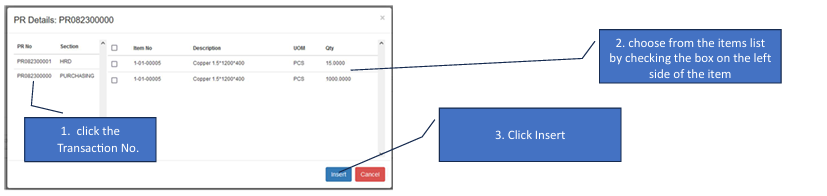
Reference (PR/SO) → Click the Reference (Insert) button to pull items from an existing Purchase Request or Sales Order.Select from Reference (If using Method 2):
Click the specific Transaction No. in the pop-up window.
Check the boxes on the left for the items you need.
Click Insert.Save
Review your quantities and click the Save button.
How to Edit a Transaction
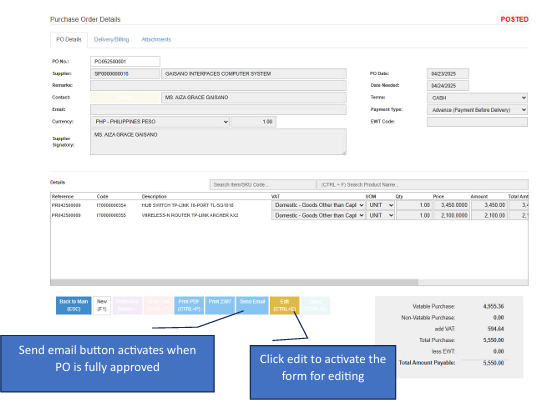
💡 Note: You can only edit transactions that have not yet been fully approved.
Enter Edit Mode
Click the Edit button to unlock the form.Modify Details
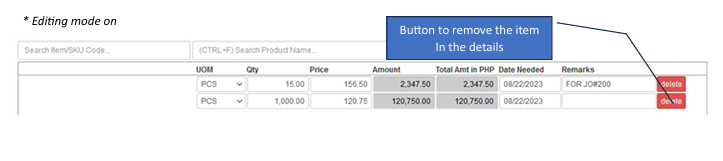
Update the quantities, payment terms, or items as needed.Commit Changes
The Save button will activate while in editing mode. Click it to finalize your updates.
Dashboard Actions
Go Back to List: Click this to exit the form without saving.
Filtering: Use the parameters on the main dashboard to track PO statuses or search by supplier.