Payment Terms
Payment Terms define the payment conditions applied to customer and supplier transactions. These terms control due date calculation, payment schedules, and aging in the ERP system.
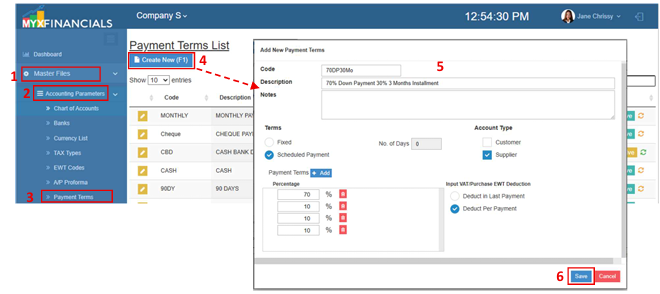
How to Create a New Payment Terms:
- Go to Master Data Files.
- Click Accounting Parameters
- Click Payment Terms
- Click Create New (F1)
- Enter the details of the Payment Terms.
- Click Save
How to Update a Payment Term:
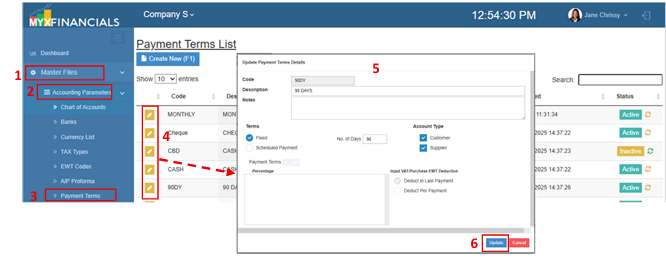
- Go to Master Data Files.
- Click Accounting Parameters
- Click Payment Terms
- Click the yellow button
- Update the details of the Payment Terms.
- Click Update
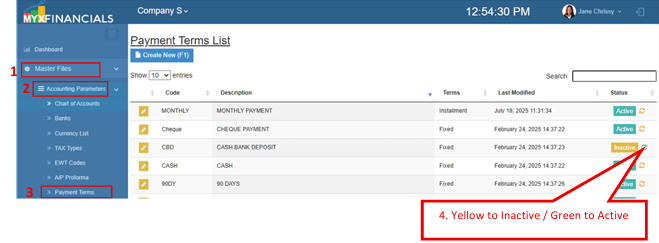
How to Inactive the Payment Terms
- Go to Master Data Files.
- Click Accounting Parameters
- Click Payment Terms
- Click the yellow cycle icon or Inactive
o Click the green cycle icon or Active to activate the item