Inventory Adjustments
Inventory adjustment in a sales and inventory system refers to the process of modifying the recorded inventory levels to reflect the actual quan ty of products or goods on hand in a more accurate and up to-date manner. Inventory adjustments are essen al for maintaining accurate inventory records,ensuring that the system's informa on matches the physical inventory in the warehouse or storage area.
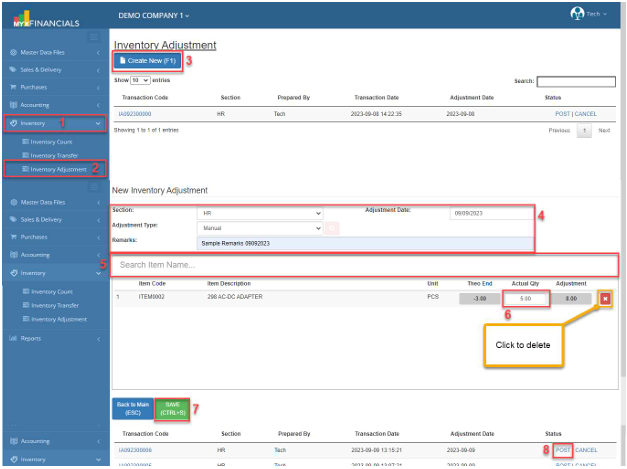
How to Add New Inventory Adjustment :
- Go to Inventory
- Click Inventory Adjustment
- Click Create New (F1)
- Enter the Section, Adjustment Type, Remarks and Adjustment Date.
- Select an item
- Enter the amount in Actual Qty.
- Click Save (CTRL+S)
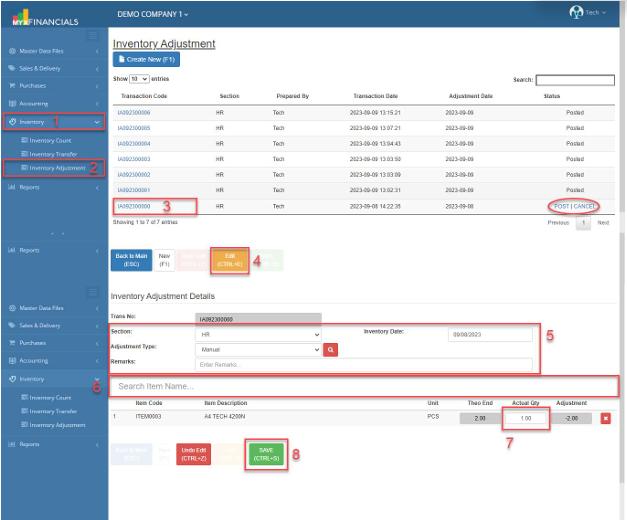
How to Update the Inventory Adjustment:
- Go to Inventory
- Click Inventory Adjustment
- Select and click the Transaction Code.
- Click Edit (CTRL+E)
- Enter the new details for Section, Adjustment Type, Remarks, and Inventory Date.
- You can also add another item. Enter the Item Code or Description.
- Enter the new Actual Qty of the item.
- Click Save (CTRL+S)
✔️ o Posted Inventory Adjustment is not allowed to be updated.
✔️ o Grayed out is not allowed to be updated.